

I Bought a Mac Mini to Run Moltbot and Local AI
My goal: Build a system where AI replaces organizational roles and have digital co-workers

I joined the wave of people buying a Mac Mini to run local AI. My motivation is not to play with chatbots. I want infrastructure for a local AI lab at home.
Specifically, I bought this machine to run Moltbot (the viral open-source agent gateway formerly known as Clawdbot) in a restricted, self-hosted environment.
This isn’t about benchmarks or flexing hardware specs. It’s about operationalizing a philosophy I call the AI-First Operating Doctrine. The goal isn’t just to “use AI,” but to build a system where AI replaces organizational roles such as research associates, editors, and producers, leaving humans to provide taste and judgment.
To make that Doctrine a reality, I needed a machine that could run long-horizon agentic workflows 24/7. Here is why I rejected the “AI PC,” dodged the Apple marketing traps, and landed on a very specific configuration.
The Objective: The Moltbot Workload
Before talking specs, we have to understand the workload.
Moltbot (formerly Clawdbot) is not a productivity app. It is a headless agent that lives on your server but interfaces with you via WhatsApp, Telegram, or Signal. It has persistent memory, tool access (terminal, browser, file system), and “employee-like” behavior.
In my Doctrine, Moltbot acts as the orchestration layer. It isn’t a tool I open; it is a “Research Associate” that I text. I might ping it from my phone while going for a walk:
“Check the NAS for the latest recording, transcribe it, and draft three LinkedIn hooks based on the ‘Hacker Trap’ framework.”
Because Moltbot has shell access and runs 24/7 to listen for incoming messages, running it on my daily driver computer or on a laptop was a security nightmare and an uptime impossibility. I needed an isolated, always-on “body” for the agent to inhabit. That is what this Mac Mini is.
The Purchase Journey: Avoiding the “Value Traps”
My decision-making process moved from “Spec Sheet Buying” to “System Architecture Buying.” I almost made three expensive mistakes before finding the right answer.
Phase 1: The “Hacker” Temptation
I started by looking at the Minisforum AI X1.
On paper, it’s a dream: AMD Ryzen AI 9, OCuLink for external GPUs, and the freedom to wipe the OS for Proxmox or Linux.
The Rejection: I realized that for a home lab, “freedom” often looks like “maintenance.” I didn’t want a loud, depreciating PC that required constant driver fiddling. I wanted the resale value, silence, and Unix polish of a Mac. I want to debug my agents, not my BIOS.
Phase 2: The “Side-Grade” Trap
Next, I considered the standard Mac Mini M4 with 32GB RAM.
The Rejection: I currently have an iMac M3 with 24GB of RAM. Buying a 32GB machine would have been a relatively expensive mistake, offering only 8GB of extra headroom. I would have hit the exact same “Out of Memory” walls on the Lab machine that I hit on my Desktop. What I needed is a tier shift, not a bump.
Phase 3: The “Value” Trap
I looked at the Mac Studio M4 Max.
The Rejection: On paper, it’s a beast. In reality, the base model has 36GB of RAM. For AI, RAM capacity is binary: you either fit the model, or you don’t. The Studio was too expensive to run small models, yet had too little memory to run massive (70B) quantized models. It was the “worst of both worlds” for my specific needs.
Phase 4: The “Unicorn” (The Final Config)
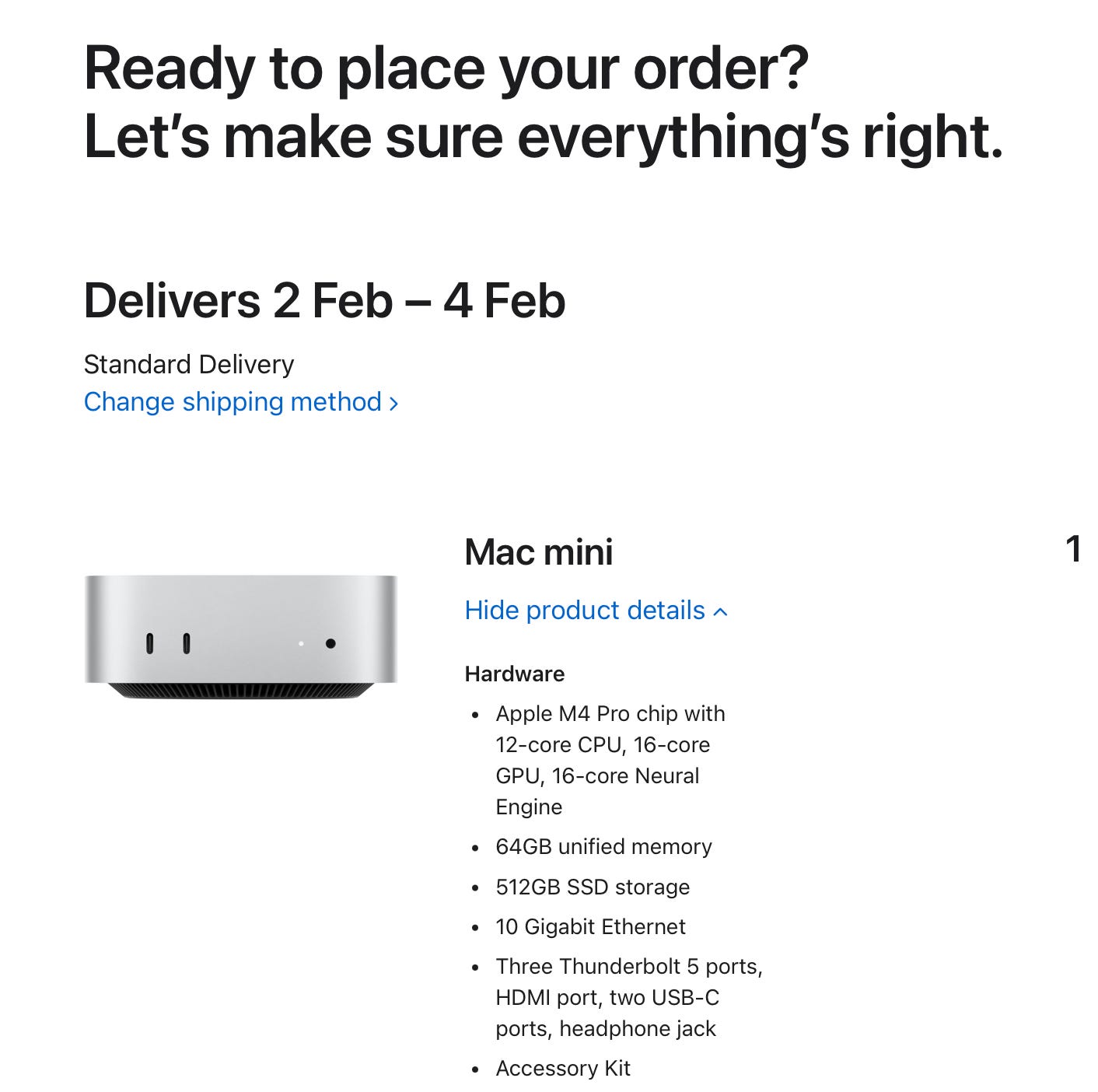
I identified a configuration in the Mac Mini M4 Pro lineup that acts as a “Kill Shot” for local AI.
Chip: Base M4 Pro (12-Core). I didn’t pay for the 14-core upgrade. AI inference is bottlenecked by memory bandwidth, not CPU cores.
Memory: 64GB RAM. This is the critical spec. 48GB would run a 70B model but choke if I opened a browser. 64GB allows me to run a “Smart” 70B model (like Llama-3-70B) and my swarm of Moltbot agents simultaneously without swapping.
Network: 10Gb Ethernet.
Storage: 512GB (Base).
The Logic: I have a 10Gb NAS with 24TB+ of storage. I don’t need expensive Apple internal storage. With 10GbE, I can pull massive 40GB model weights from my NAS to the Mac’s RAM in seconds, not minutes. This turns the NAS into “near-local” storage.
The Killer Feature: Unified Memory
Why go through all this trouble for a Mac when NVIDIA exists?
Unified Memory Architecture (UMA).
On a PC, you are limited by the VRAM on your GPU (usually 24GB for a top-tier consumer card). If a model needs 30GB, you simply can’t run it fast.
On the Mac, the GPU has access to the entire 64GB system memory pool. The M4 Pro provides 273GB/s of memory bandwidth (2x my iMac). This allows me to run massive, high-intelligence models that would choke a standard PC, all in total silence.
The “Day 0” Stack: A Headless Laboratory
This Mac Mini will be my headless compute node that I access remotely.
Here is the Day 0 plan to make the Doctrine a reality:
OrbStack (The Container Layer): I am avoiding Docker Desktop. OrbStack is lighter, faster, and respects system resources. This is crucial when I need every gigabyte of RAM for inference.
Moltbot (The Agent): Running inside the Mac Mini. This effectively “sandboxes” the agent. Since Moltbot has tool-use capabilities (it can read files and execute code), running it bare-metal on my personal machine was a security risk. On the Mac Mini, it lives in a controlled environment.
The Pipeline:
The Bigger Question
This hardware choice shapes how I build. By constraining myself to Apple Silicon, I’m forced to optimize for memory efficiency and latency rather than brute-forcing with raw power.
If you are running an AI lab at home, where did you hit the wall?
Was it memory capacity, token speed, or software compatibility? Tell me your bottleneck so I can try to break it on my end.
Follow Prof Rod AI as I build out the AI-First Operating Doctrine, I will be building in the open and sharing all my findings, discoveries and highlights of working with local AI.