
Choose a scheduled publication timezone
Say your publication rule is: this article becomes available on 2026-09-11, London time. That sentence hides four different clocks. There is the UTC instant a server actually receives a request at. There is the London calendar date that instant maps to, which depends on whether British Summer Time is in effect. There is the moment your build process finished producing the HTML. And there is the moment a cache last decided what to serve for that URL. A rule written in one sentence has to be enforced consistently across all four, or you get a page that is "published" by one clock and absent by another.
GitHub's documentation for scheduled workflows says scheduled events can be delayed during heavy load, and sufficiently high load can cause queued jobs to be dropped. A cron schedule therefore does not guarantee exact release timing. Define the reader-visible contract before choosing whether a scheduled build can satisfy it.
Converting the boundary instant
Start with the conversion itself, since everything downstream depends on getting it right. Suppose the rule is "available starting 2026-09-11 in Europe/London." We need to turn a UTC instant into a London calendar date and compare it against that target.
from datetime import datetime, date
from zoneinfo import ZoneInfo

LONDON = ZoneInfo("Europe/London")
TARGET_DATE = date(2026, 9, 11)

def london_date(iso_utc: str) -> date:
    instant = datetime.fromisoformat(iso_utc)
    if instant.tzinfo is None or instant.utcoffset() is None:
        raise ValueError("An explicit UTC offset is required")
    return instant.astimezone(LONDON).date()

def is_eligible(iso_utc: str) -> bool:
    return london_date(iso_utc) >= TARGET_DATE

for stamp in ["2026-09-10T22:59:59+00:00", "2026-09-10T23:00:00+00:00"]:
    print(stamp, "->", london_date(stamp), is_eligible(stamp))
The expected boundary results are: 2026-09-10T22:59:59+00:00 converts to 2026-09-10 in London (British Summer Time is UTC+1 in September, so 22:59:59 UTC is 23:59:59 BST, still the 10th) and is_eligible returns False. One second later, 2026-09-10T23:00:00+00:00 converts to 2026-09-11T00:00:00 BST, is_eligible returns True. The boundary sits exactly where the calendar date flips under the London offset, not at UTC midnight.
The function rejects a timestamp without an explicit offset. Otherwise Python can interpret a naive datetime using the host's local timezone, introducing an undeclared machine setting into the release decision. An offset-aware instant makes the conversion explicit. These local calculations still need separate checks against the actual route and cache that serve readers.
Why the pure function isn't the whole system
Suppose a route handler evaluates is_eligible whenever it executes. A cached response can bypass that handler entirely. A static export can also have made the inclusion decision earlier. In either case the function's source may be correct while the reader receives bytes produced before the release boundary. Trace the serving path before assuming every request runs the function.
Concretely: a build finishes at 22:50 UTC on the 10th, producing a static page for this article that reflects the state "not yet published" (perhaps a 404, perhaps a stub). A visitor requests that route at 23:05 UTC, after the boundary. The eligibility function, if it were consulted fresh, would say True. But if the response is served from that static build or from a cache entry keyed before the boundary, the visitor sees the pre-boundary state anyway. The route and the cache are answering a different, older question than the one the eligibility function just answered.
The cache branch can return without calling the runtime function. A request-time design must prevent a stale pre-release response from surviving the boundary, for example by disabling caching for unavailable routes and bounding any relevant cache lifetime. Test the resulting headers and serving behavior; a comment about cache policy cannot establish what the edge actually does.
Testing is_eligible in isolation only proves the pure conversion is correct for the inputs you tried. It says nothing about whether the route, the build artifact, or an edge cache actually consult that function before responding. Treat these as separate claims requiring separate checks.
Build time versus request time as a design decision
The pipeline needs a stated availability contract. "Publication" can mean two different contracts:
| Definition | What determines visibility | Failure mode if unhandled |
|---|---|---|
| Request-time eligibility | Every request re-evaluates is_eligible against current UTC time | Correct instant, but requires dynamic rendering or cache bypass at the boundary |
| Build-time eligibility | A build run decides inclusion once; visibility follows deployment completion | Boundary drifts to whenever the build or deploy job happens to run, not the declared instant |
Neither is wrong in general. For an embargo, evaluate eligibility at serving time or use a boundary-aware cache policy, and prevent all alternative routes from exposing the content early. Even that design needs an availability objective: network delivery itself is not instantaneous. A course platform publishing lesson content on a rolling schedule might accept build-time eligibility, where "the 11th" means "whichever build after 2026-09-11T00:00 BST first includes it," and treats a few minutes of build-and-deploy latency as acceptable slack. The mistake isn't picking one; it's leaving the choice implicit so different parts of the pipeline assume different answers.
An earlier version of this site's scheduled publication workflow marked a date as deployed after receiving a successful response from a deployment hook. Reading that historical implementation revealed a missing observation: a hook accepting a request does not establish that the deployment completed or that the article URL became reachable. The workflow is an example of the distinction, not evidence that an outage occurred. For your own pipeline, separate job acceptance, successful deployment and observed route availability in the release record.
Extending to the clock change
The London offset isn't fixed. BST (UTC+1) runs roughly late March to late October; the rest of the year London sits at UTC+0. The September instants above keep their September interpretation whenever the test runs. To exercise winter behavior, add winter dates; running the same fixed September fixture in November does not change its offset. If your test suite hardcodes "23:00 UTC is midnight London" without deriving it from zoneinfo, that assumption breaks the moment the calendar crosses the October transition. This is exactly why the worked function above calls .astimezone(LONDON) rather than adding a fixed one-hour offset by hand: zoneinfo carries the transition rules, so the same code handles both halves of the year correctly, but only if you actually let it do the conversion rather than pre-computing an offset once and reusing it.
Define it against zoneinfo.ZoneInfo, not a hand-computed offset, so daylight-saving transitions are handled by the library rather than by a stale assumption in your code.
Check an instant just before and just after the target date in a BST-affected month, then repeat for a month when BST is not in effect, to confirm the offset derivation rather than a memorized constant.
Write down, for your own pipeline, whether "published" means the boundary instant or the next successful build after it. Treat this as a stated contract, not an implied default.
Separately confirm that the URL a reader hits, including any CDN or static cache layer, reflects the same eligibility state the pure function computes, at the same instant.
Checkpoint
Check the decision
Building the operating check before trusting a rollout
Use the September pair as one boundary test, then add a winter pair and a catch-up date well after release. Parameterize the target date when adding those cases rather than accidentally testing winter timestamps against September's release date.
| Release date in London | UTC instant immediately before | UTC instant at release |
|---|---|---|
| 2026-09-11 | 2026-09-10T22:59:59Z | 2026-09-10T23:00:00Z |
| 2026-11-01 | 2026-10-31T23:59:59Z | 2026-11-01T00:00:00Z |
Then run the serving test against the same built artifact on both sides of the boundary. Check the article route, its listing, feeds, discovery indexes and images. Before release, titles and excerpts can leak through discovery even when the article itself returns 404. After release, an article that loads directly but never appears in its listing is still an incomplete publication.
The second diagram separates deployment acknowledgment from the observation you need to record. Store the final URL, status, expected content identifier and observation time. Probe through the delivery path readers use; an origin-only check cannot establish edge-cache behavior.
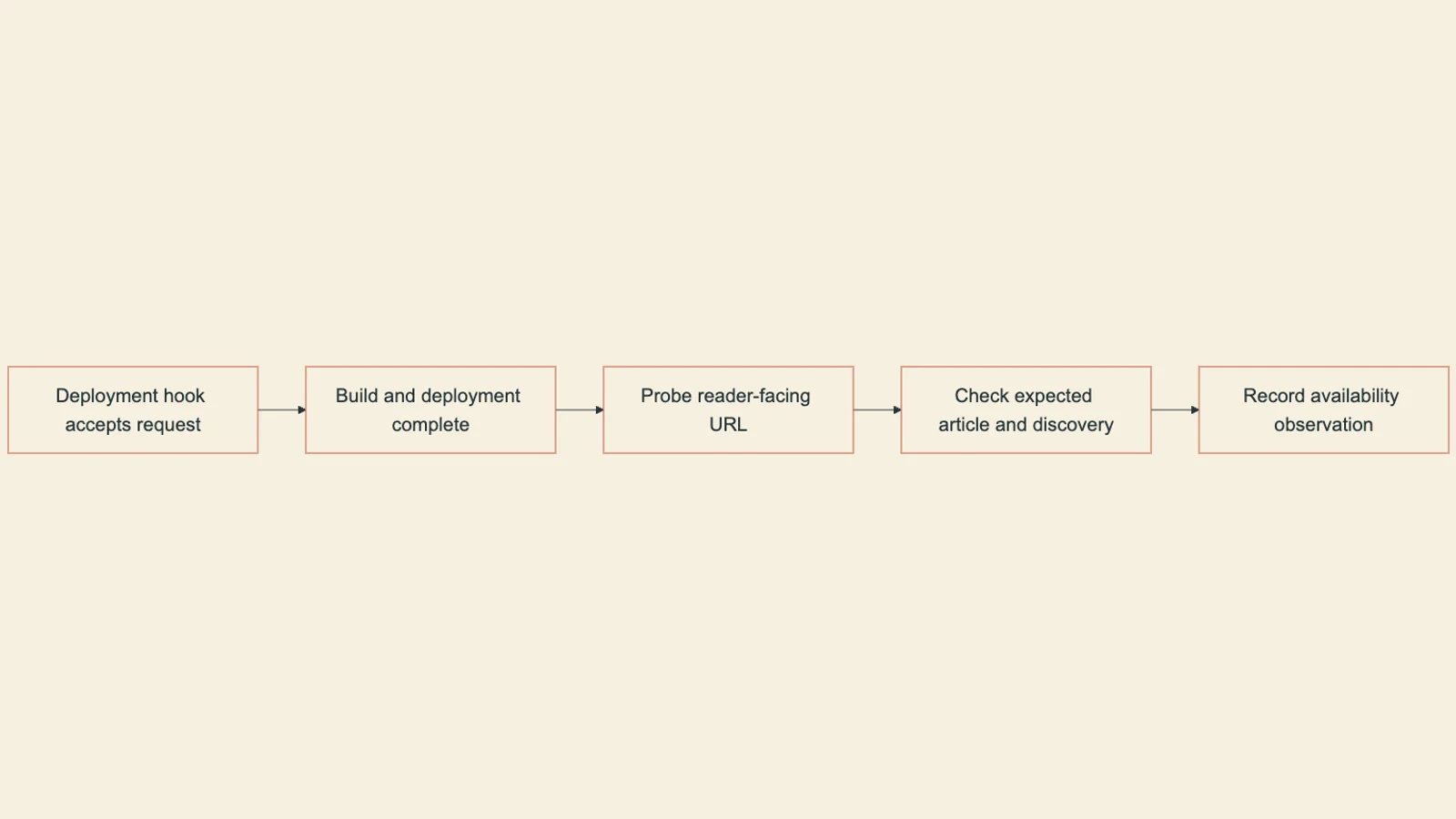
For a request-time design, advancing the test clock should reveal eligible content without rebuilding. For a build-time design, state the expected delay and verify the next successful deployment. Keep unobserved production behavior separate from a passing local boundary test.
The course develops tools, validation and handoffs that turn a working demo into a workflow another person can inspect.


