
U.S. teaching example: Amounts are fictional USD prices, stored as integer cents. This is a U.S. version of the shop exercise, not a currency conversion or a record of a real charge.
Five vanilla tubs pass every schema check. Lucy needs six.
Consider this hypothetical replenishment task. A supplier-replenishment assistant receives a JSON object: {"sku": "vanilla", "quantity": 5}. The sku field is a nonempty string. The quantity field is a positive integer within a sane range. Every type matches, every required field is present, nothing extra sneaks in. It passes a schema that requires those two fields and constrains quantity to an integer from 1 to 50.
It is also wrong. Lucy has two tubs of vanilla ice cream in stock and a target level of eight. She needs six, not five. The object that passed validation would leave her short by one tub if anyone acted on it.
This is the gap between two questions that sound similar but are not: "Is this JSON shaped correctly?" and "Is this the correct business decision?" A parser and a schema validator answer the first question. Answering the second requires comparing the proposal against facts the model was never given control over: current stock, target stock, price, and an approved budget. Confusing these two checks is a common way for a system that "looks tested" to still approve the wrong action. This article works through exactly where that second check has to live, what it needs to know, and what happens when a proposal fails it for different reasons.
LLM business rule validation needs trusted context
A JSON parser turns text into Python objects. A schema validator, such as Pydantic operating in strict mode, additionally checks that those objects match declared types and constraints without silently converting a string "6" into the integer 6. Pydantic's own strict-mode documentation notes that coercion behavior differs by field type and by whether the input arrived as JSON or as a Python object, so a check that holds for one field type should not be assumed to hold for another without checking the current version (Pydantic, strict mode docs, retrieved 2026-09-10).
The positive-integer check alone does not know the required stock level. A field constrained to integers from 1 to 50 accepts 4, 5 and 6; it rejects 500. The allowed range is a useful constraint, but it does not select which permitted value this shop needs today.
Pydantic can also perform business validation, including through validation context or custom model validators. You could generate a schema with an exact quantity constraint from a trusted snapshot. Those implementations still need the stock facts that establish six as the correct value. The distinction here is between checking a generic shape and checking a proposal against authoritative business context, not between what libraries are capable of doing.
Work through a hypothetical replenishment order
Consider a shop snapshot with three products, each carrying on-hand stock, a target stock level, and a price in cents.
| SKU | On hand | Target | Required max(0, target − on hand) | Price per tub | Line cost |
|---|---|---|---|---|---|
| vanilla | 2 | 8 | 6 | 250 cents | 1,500 cents |
| chocolate | 12 | 6 | 0 | 300 cents | 0 cents |
| strawberry | 1 | 5 | 4 | 275 cents | 1,100 cents |
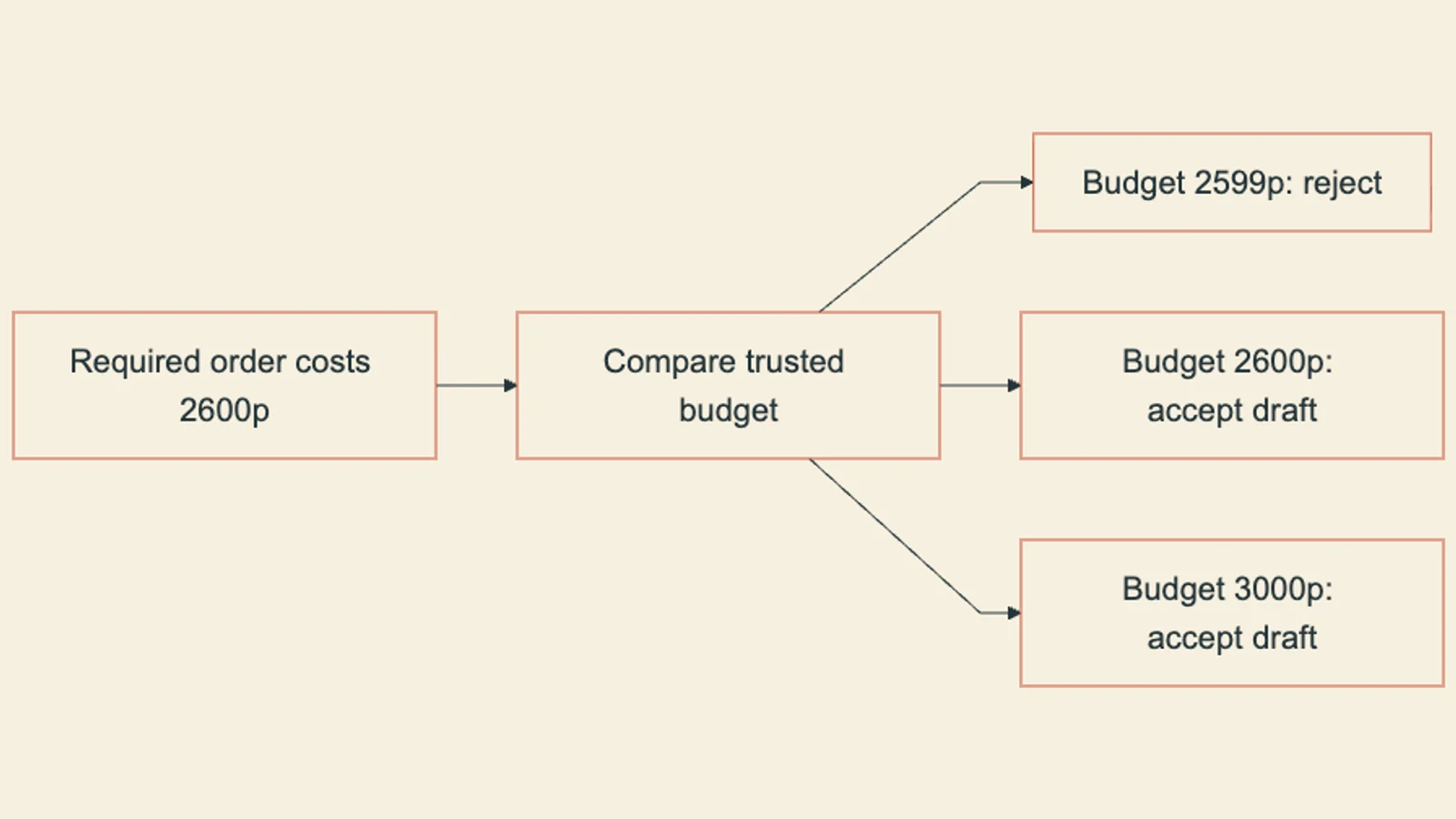
The required quantity for each product is max(0, target - on_hand), computed entirely from the trusted snapshot. Chocolate is already over its target, so its required quantity is zero and it drops out of the correct order. Summing the two nonzero lines gives a correct total cost of 2,600 cents, against a budget of 3,000 cents in this teaching scenario. This arithmetic does not involve the model at all. It is the reference answer the proposal will be checked against.
Compare four candidate drafts. The first two rows abbreviate the relevant line inside an otherwise structurally valid draft. Three candidates fail a business check; the fourth passes:
| Candidate draft or line excerpt | Shape check | Business check | Result |
|---|---|---|---|
{"sku": "moon-cheese", "quantity": 3} | passes | SKU not in trusted catalog | rejected: unknown SKU |
{"sku": "vanilla", "quantity": 5} | passes | required is 6, not 5 | rejected: quantity mismatch |
| Full correct draft, total 2,600 cents | passes | exceeds a 2,000 cents budget | rejected: budget exceeded |
| Full correct draft, total 2,600 cents | passes | matches required, within 3,000 cents budget | accepted draft |
Every rejected row here has valid JSON. None of them fails because a bracket is missing or a type is wrong. Each fails because ordinary Python, running after the schema check, compared the proposal against trusted data the schema validator never saw. Here the application performs business validation after structural validation. A custom validator could perform both, provided it receives the same trusted context.
This worked case is adapted from a teaching lesson in an existing course, Validate the Business Decision and Bound the Repair Loop, which builds the full Pydantic models, a PolicyError exception, and a bounded two-attempt repair loop around this exact shop scenario, including the exact-budget boundary and an all-stocked case with an empty accepted draft.
The mechanism: where each check happens
The image above shows the pipeline stages a proposal passes through: raw text becomes a parsed object, the parsed object is checked against a schema for shape, and only then is it compared against a separately loaded trusted snapshot to produce either an accepted draft or a named rejection.
Two properties matter here. First, the trusted snapshot is loaded independently of the proposal; the proposal cannot edit the budget or the catalog, because those fields simply are not part of its schema. Second, the comparison step at "E" is ordinary code, not another model call. It is a dict equality check between what the proposal asked for and what the snapshot arithmetic requires. Anthropic's engineering notes on writing tools for agents observe that how a tool's inputs, outputs, and failure states are structured shapes how reliably an agent can use it (Anthropic, writing tools for agents, 2025-09-11, retrieved 2026-09-10). Naming each rejection reason explicitly, rather than returning one generic "invalid" status, is that same idea applied to a business-rule boundary: a model retrying against a named unknown_sku error can behave differently than one retrying against a named budget_exceeded error, because the permitted recovery depends on the source of the error.
That distinction sets up a bounded repair policy. A schema type mistake, like sending quantity as the string "6" instead of the integer 6, can reasonably trigger one more attempt with feedback about the type error. An approved budget that is too small, or a snapshot that has gone stale because someone else already recorded a sale, cannot be fixed by asking the model to try again; no amount of regeneration changes an approved spending limit or restores a snapshot's currency. The course lesson referenced above bounds this at two total attempts and stops immediately, without retrying, on a stale snapshot or an exceeded budget, returning those to a human reviewer instead.
Building the check yourself
Define two separate schemas: one for the trusted snapshot (stock, target, price, budget, currency, a snapshot identifier) and one for the untrusted proposal (SKU and quantity per line, plus a free-text explanation). Keep budget and price fields out of the proposal schema entirely, so a proposal cannot supply or override them even by accident.
Compute the reference answer from the trusted snapshot alone: for each item, required = max(0, target - on_hand), and sum required * price across items to get the reference total. This calculation must not call the model.
Check duplicate SKUs before constructing a lookup, then compare the complete proposed quantity mapping against the reference: reject on any SKU not present in the trusted catalog, reject if the proposed quantities do not exactly equal the required quantities, and reject if the total exceeds the trusted budget. Return a distinct, named reason for each rejection rather than one generic failure.
If the proposal can supply its own trusted budget, even perfectly valid fields can authorize the wrong spend. Keep policy values in the application-owned input and reject unexpected policy fields in model output. An extra-field rule protects the declared boundary only if you actually validate the untrusted object before using it.
The following standard-library function isolates the quantity and budget checks. It assumes stock rows and order lines already passed type, range and required-field validation, and catalog SKUs are unique. The course lesson supplies that complete Pydantic boundary. This helper still checks duplicate proposal keys before dictionary construction, so an overwrite cannot hide a repeated line.
def check_business_rules(lines, stock, budget_cents):
    catalog = {item["sku"]: item for item in stock}
    keys = [line["sku"] for line in lines]
    if len(keys) != len(set(keys)):
        return "duplicate_sku"
    proposed = {line["sku"]: line["quantity"] for line in lines}
    if not set(proposed).issubset(catalog):
        return "unknown_sku"
    required = {
        item["sku"]: item["target"] - item["on_hand"]
        for item in stock if item["target"] > item["on_hand"]
    }
    if proposed != required:
        return "replenishment_mismatch"
    total = sum(quantity * catalog[sku]["price_cents"]
                for sku, quantity in proposed.items())
    if total > budget_cents:
        return "budget_exceeded"
    return {"status": "accepted_draft", "total_cents": total}


stock = [
    {"sku": "vanilla", "on_hand": 2, "target": 8, "price_cents": 250},
    {"sku": "chocolate", "on_hand": 12, "target": 6, "price_cents": 300},
    {"sku": "strawberry", "on_hand": 1, "target": 5, "price_cents": 275},
]
good = [{"sku": "vanilla", "quantity": 6},
        {"sku": "strawberry", "quantity": 4}]
assert check_business_rules(good, stock, 2600) == {
    "status": "accepted_draft", "total_cents": 2600
}
assert check_business_rules(good, stock, 2599) == "budget_exceeded"
print("Exact-budget draft accepted; one penny below rejected")
The helper does not fetch live stock, check snapshot freshness or purchase anything. Those are separate operations around this calculation. Bind the draft to the snapshot that was validated and recheck the relevant business conditions before execution; a correct result for an old snapshot does not authorize a current purchase.
A customer request in one currency compared against a budget stored in another is a distinct failure from a business-rule mismatch. Do not let a model infer or apply an exchange rate as part of validation; obtain an authorized rate and rounding policy separately, or reject the mismatch outright.
Testing the boundary, not just the happy path
A validator that only ever sees valid, in-budget proposals has not been tested at its actual job. The boundary cases are where a schema check and a business check can be silently confused with each other. Two are worth working through explicitly.
For the 2600 cents reference total, the budget test uses > to reject an overrun. A budget of 2600 cents accepts; 2599 cents rejects. Test those adjacent values, since a test far above and far below the limit would not distinguish > from >=.
 At zero required work: if every product is already at or above its target, the correctly computed reference order is an empty list of lines, costing zero. An empty proposal against that snapshot should be accepted. This case matters because it is easy to write validation code that treats an empty proposal as automatically suspicious, when in this business rule an empty order is sometimes the exactly correct answer. It is equally easy to confuse a legitimately empty catalog with a catalog that failed to load; those are different failures and should not share a code path, since a failed read masquerading as "nothing to order" is a much worse bug than either failure alone.
Check the decision
What changes when the schema carries policy
A schema built from trusted stock could constrain vanilla quantity to exactly six. That would reject five during schema validation. It would implement the business rule at a different location, rather than remove the need for trusted state. The application must still show where the value six came from and which snapshot the generated constraint represents.
Likewise, a Pydantic model validator can compare a draft with application-supplied context. The course uses an explicit function to keep those inputs visible. Either approach can work; choose one whose data flow and failure cases the receiving engineer can inspect. Test wrong quantities, duplicate lines, unknown products, stale snapshots and exact-budget equality under the actual boundary you chose.
A successful local calculation establishes the result for its supplied data. It does not demonstrate that a production database supplies fresh records, that the execution step uses the same snapshot, or that a supplier accepted an order. Keep the accepted draft and the execution receipt distinct.
A usable next action
Before wiring an LLM proposal into any action that spends money, changes inventory, or commits to a customer, write down the reference calculation in plain code first, independent of any model output. Then write the comparison step as a named-error function, the way the worked example above does, so a schema failure, an unknown SKU, a quantity mismatch, and a budget overrun each produce a distinct, loggable outcome rather than one undifferentiated rejection. Only after that separation exists does it make sense to ask whether a bounded number of regeneration attempts is worth adding, and for which of those named errors regeneration could plausibly help.
The referenced course lesson builds this exact validator, its bounded two-attempt repair loop, and a transfer exercise that adds a new product without moving the budget.


