Get Started with LangGraph, the Current Way: One Eval Item as a Graph
Prerequisite: you can read Python and have called a model API at least once. No LangGraph or LangChain experience needed.
After this lesson, you can: build and run a graph that generates and grades one eval item, explain what a node, an edge and the state are, and use create_agent instead of the deprecated create_react_agent.
Install what the course uses
pip install -U langgraph langgraph-checkpoint-sqlite langchain langchain-anthropicIn a Colab cell, put % in front: %pip install -U .... The lessons were run with langgraph 1.2.12, langgraph-checkpoint-sqlite 3.1.1 and langchain 1.4.3 on Python 3.12. If your versions differ and something breaks, pin those versions first, then read the release notes.
langgraph holds the graph machinery. langgraph-checkpoint-sqlite holds the SQLite checkpointer that lesson 05 uses to survive a crash. langchain and langchain-anthropic are only needed when you swap the stand-in model for a real one.
One eval item as a graph
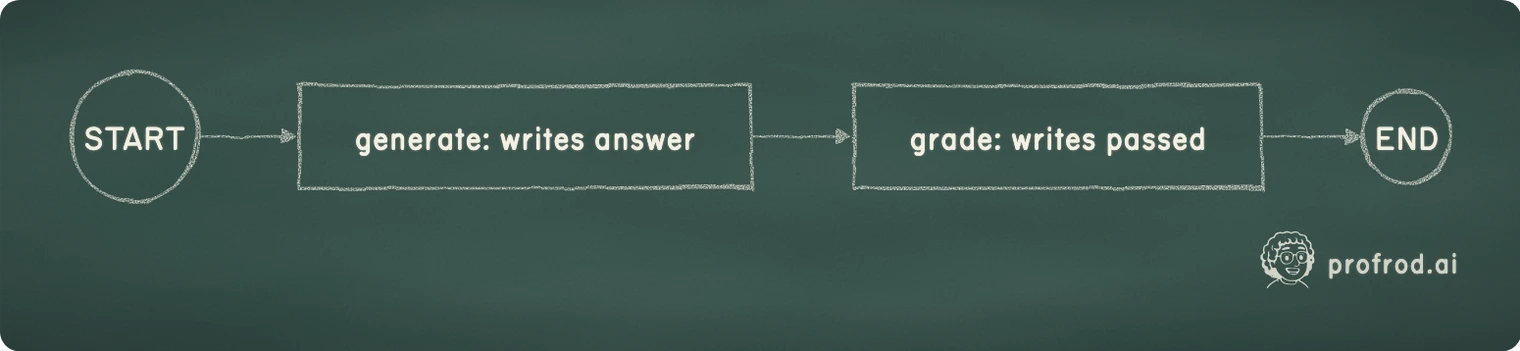
The smallest useful research graph is one evaluation item: a model answers a question, a grader checks the answer against a reference. Here it is with a stand-in model, so it runs with no API key.
from typing import TypedDict

from langgraph.graph import StateGraph, START, END


class ItemState(TypedDict):
    question: str
    reference: str
    answer: str
    passed: bool


def generate(state: ItemState) -> dict:
    # Stand-in for the model under test. The next section swaps in a real model.
    return {"answer": "Paris" if "France" in state["question"] else "I am not sure"}


def grade(state: ItemState) -> dict:
    # Stand-in for a grader: exact match after normalizing case and spaces.
    return {"passed": state["answer"].strip().lower() == state["reference"].strip().lower()}


builder = StateGraph(ItemState)
builder.add_node("generate", generate)
builder.add_node("grade", grade)
builder.add_edge(START, "generate")
builder.add_edge("generate", "grade")
builder.add_edge("grade", END)
graph = builder.compile()

print(graph.invoke({"question": "What is the capital of France?", "reference": "paris"}))
print(graph.invoke({"question": "What is the capital of Peru?", "reference": "Lima"}))
Output from running this cell:
{'question': 'What is the capital of France?', 'reference': 'paris', 'answer': 'Paris', 'passed': True}
{'question': 'What is the capital of Peru?', 'reference': 'Lima', 'answer': 'I am not sure', 'passed': False}
Three ideas carry the rest of the course.
- State is the
TypedDict. Every node reads it and returns a partial update:generatereturns onlyanswer,gradereturns onlypassed. LangGraph merges each update into the state. - Nodes are plain Python functions. Nothing about them is specific to LangGraph, which is why you can test
gradeon its own. - Edges say what runs next.
STARTandENDare the entry and exit.compile()checks the wiring and returns a runnable graph with.invoke()and.stream().
Swap in a real model
When you want real numbers, replace the two stand-in functions. This version asks Claude for the answer and asks it again, as a judge, for a structured verdict. It needs ANTHROPIC_API_KEY in the environment. It was not run for this lesson, so no output is shown.
from langchain.chat_models import init_chat_model
from pydantic import BaseModel, Field

model = init_chat_model("anthropic:claude-opus-5")


class Verdict(BaseModel):
    passed: bool = Field(description="True if the answer matches the reference in substance")
    confidence: float = Field(description="How sure you are, from 0 to 1")


judge = model.with_structured_output(Verdict)


def generate(state: ItemState) -> dict:
    # .text joins the reply's text blocks; a reply can also carry thinking blocks.
    return {"answer": model.invoke(state["question"]).text}


def grade(state: ItemState) -> dict:
    verdict = judge.invoke(
        f"Question: {state['question']}\nReference: {state['reference']}\n"
        f"Answer: {state['answer']}\nDoes the answer match the reference?"
    )
    return {"passed": verdict.passed}
The graph does not change. That separation is the point: the wiring is tested with stand-ins, and the model is a replaceable part. The judge's confidence field comes back in lesson 04, where the graph routes on it. A model's stated confidence is a number it produced, not a calibrated probability; chapter 11 of the book shows how to check calibration before you trust one.
The current agent factory, next to the deprecated one
For a model that calls tools in a loop, LangChain ships a prebuilt agent. The import moved in the 1.0 release.
from langchain.agents import create_agent


def lookup_paper(arxiv_id: str) -> str:
    """Return the title of an arXiv paper from the local reading list."""
    return {"2305.18290": "Direct Preference Optimization"}.get(arxiv_id, "NOT_FOUND")


agent = create_agent(
    model="anthropic:claude-opus-5",
    tools=[lookup_paper],
    system_prompt="You help a researcher check citations. Use the tool for arXiv ids.",
)
Two things changed: the import path, and the keyword for instructions, which is now system_prompt. If you pass the old prompt= keyword to create_agent, langchain 1.4.3 raises TypeError: create_agent() got an unexpected keyword argument 'prompt'. That was checked by running it. A loud error at construction is the good kind: you find out before the run, not after.
Both factories return a compiled graph, so .invoke(), .stream() and checkpointing work the same way on an agent as on the graph you built above. Lesson 07 opens up what the agent does inside, and you execute a tool call yourself with ToolNode.
What this buys you before lesson 02
You have a graph that runs one eval item end to end, a way to test it without a model, and the current import for the prebuilt agent. An eval set is many items, and a real harness grades each one more than one way. Lesson 02 is about the state that holds all of that, and the rule LangGraph enforces when two nodes write the same key at once.
State as a typed contract: reducers, and the error LangGraph raises when two graders write one field in the same step.
Reply here and it goes straight to Rod. Same as replying to one of his emails.


