
An agent runs your tool's doctor command. The tool sees a terminal, decides a person is there, and opens a browser login. Nobody is there. The agent waits, then guesses, then retries.
That happened with our own website tooling. We run our products with agents as the main operators, and on October 12, 2026 we audited them against one question: can an agent with no prior context do the product's main job using only the product's own commands? None of them could yet. The tools worked. They had been built for a person who already knew them.
What you will make: a 99-line Python command-line tool, jobs, that submits, inspects and waits on a background job. It has no prompts, distinct exit codes, versioned JSON, a machine-readable catalog, a wait command and errors that name the next step. You need Python 3.9 or newer and nothing else: no package, account or model.
The jobs tool and every output below were executed on October 12, 2026 with Python 3.14.6. The failure patterns come from audits of our own products on the same day. Those records are private, so treat them as our observations, not as results you can rerun. We have not measured how many tokens the fixes save, and we don't claim a number.
Where agents lose time on human-shaped tools
Agents rarely fail outright. They lose time and tokens working around an interface that assumes context they don't have. These are the patterns we found in our own tools:
| Pattern | What the agent does | What we found |
|---|---|---|
| A prompt appears whenever there is a terminal | Hangs or guesses | A doctor opened a browser login on any TTY; a secret prompt had no TTY check |
| One exit code for everything | Reads stderr to tell "refused" from "failed" | A release controller returned 1 for both |
| No command catalog | Reads source and old notes | Only human make help existed |
| Prose reports, or JSON without a version | Parses text that changes | A doctor printed prose; a controller's JSON had no schema version |
| Polling instead of waiting | Asks "done yet?" every turn | A controller answered "running" after one look and offered no wait |
| Key facts only in prose | Reads long records to find one hash | A release hash and signature lived only in a written report |
Scroll horizontally to view columns.
Each one is small. Together they compound. An agent that can't tell a refusal from a failure retries, each retry polls, and each poll rereads prose.
Ten rules, each against one of those costs
We wrote these down as a standard and audited every product against them, rule by rule, with one line of evidence each.
| # | Rule | It removes |
|---|---|---|
| 1 | No prompts by default; a prompt needs an explicit --interactive flag | Hanging at prompts |
| 2 | --json on every report, complete and versioned ("schema": "jobs.job/v1") | Parsing prose |
| 3 | Distinct, documented exit codes | Retrying a refusal |
| 4 | help --json lists every command, flag, exit code and schema | Reading source |
| 5 | wait blocks and returns the job's own result | Polling |
| 6 | doctor checks prerequisites and names the fix | Trial-and-error setup |
| 7 | Every error says what failed and the next action | Digging through logs |
| 8 | Running a command twice is safe | Fear of retrying |
| 9 | An AGENTS.md page at the repository root | Rebuilding context each session |
| 10 | One verification gate, run by the pre-push hook | Green pushes that skipped checks |
Scroll horizontally to view columns.
Rule 1 needs care, because it disagrees with good advice written for people. The Command Line Interface Guidelines say to prompt only when stdin is an interactive terminal. That protects scripts and pipes. It doesn't protect an agent: agents often run inside a terminal multiplexer, so a TTY is attached and nobody is reading it. The same guidelines also offer a --no-input flag. For agents, make that the default and require --interactive to turn prompts on.
Check the decision
Build it
Save this as jobs.py. It keeps state in a small JSON file and simulates a job that takes a few seconds.
#!/usr/bin/env python3
"""jobs: a toy job runner with an agent-first surface (standard library only)."""
import argparse, json, os, sys, time

STATE = os.environ.get("JOBS_STATE", "jobs-state.json")
OK, FAILED, USAGE, REFUSED, NOT_FOUND, TIMEOUT = 0, 1, 2, 3, 4, 5
CODES = {"ok": OK, "failed": FAILED, "usage": USAGE, "refused": REFUSED,
         "not_found": NOT_FOUND, "timeout": TIMEOUT}
COMMANDS = {
    "submit": {"flags": ["--name NAME", "--seconds N", "--json"], "schema": "jobs.job/v1"},
    "status": {"flags": ["JOB_ID", "--json"], "schema": "jobs.job/v1"},
    "wait": {"flags": ["JOB_ID", "--timeout SECONDS", "--json"], "schema": "jobs.job/v1"},
    "help": {"flags": ["--json"], "schema": "jobs.help/v1"},
}


def load():
    try:
        with open(STATE) as f:
            return json.load(f)
    except FileNotFoundError:
        return {}


def save(jobs):
    tmp = STATE + ".tmp"
    with open(tmp, "w") as f:
        json.dump(jobs, f)
    os.replace(tmp, STATE)  # atomic: never a half-written state file


def view(job):
    done = time.time() >= job["ends_at"]
    return {"schema": "jobs.job/v1", "id": job["id"], "name": job["name"],
            "state": "succeeded" if done else "running"}


def fail(kind, message, next_step, as_json):
    if as_json:
        print(json.dumps({"schema": "jobs.error/v1", "kind": kind,
                          "exit_code": CODES[kind], "message": message, "next": next_step}))
    else:
        print(f"error: {message}\nnext: {next_step}", file=sys.stderr)
    sys.exit(CODES[kind])


def emit(obj, as_json):
    print(json.dumps(obj) if as_json else f"{obj['id']} {obj['name']} {obj['state']}")


class Parser(argparse.ArgumentParser):
    def error(self, message):  # never print usage text and exit from inside argparse
        raise ValueError(message)


def main(argv):
    p = Parser(prog="jobs")
    sub = p.add_subparsers(dest="cmd", parser_class=Parser)
    s = sub.add_parser("submit"); s.add_argument("--name", required=True)
    s.add_argument("--seconds", type=int, default=2); s.add_argument("--json", action="store_true")
    st = sub.add_parser("status"); st.add_argument("job_id"); st.add_argument("--json", action="store_true")
    w = sub.add_parser("wait"); w.add_argument("job_id"); w.add_argument("--timeout", type=float, default=60)
    w.add_argument("--json", action="store_true")
    h = sub.add_parser("help"); h.add_argument("--json", action="store_true")
    try:
        a = p.parse_args(argv)
    except ValueError as e:
        fail("usage", str(e), "run: jobs help --json", "--json" in argv)
    if a.cmd in (None, "help"):
        catalog = {"schema": "jobs.help/v1", "commands": COMMANDS, "exit_codes": CODES}
        print(json.dumps(catalog, indent=2) if getattr(a, "json", False) else
              "jobs submit|status|wait|help. Run 'jobs help --json' for the full catalog.")
        return OK
    jobs = load()
    if a.cmd == "submit":
        # Idempotent: submitting the same name twice returns the existing job.
        if a.name in jobs:
            emit(view(jobs[a.name]), a.json); return OK
        if a.seconds > 3600:
            fail("refused", f"--seconds {a.seconds} is over the 3600 limit",
                 "submit again with --seconds 3600 or less", a.json)
        jobs[a.name] = {"id": a.name, "name": a.name, "ends_at": time.time() + a.seconds}
        save(jobs); emit(view(jobs[a.name]), a.json); return OK
    job = jobs.get(a.job_id)
    if job is None:
        fail("not_found", f"no job named {a.job_id!r}", f"check the name, or create it: jobs submit --name {a.job_id}", a.json)
    if a.cmd == "status":
        emit(view(job), a.json); return OK
    deadline = time.time() + a.timeout  # wait: block until done, don't make the caller poll
    while view(job)["state"] == "running":
        if time.time() >= deadline:
            fail("timeout", f"job {a.job_id!r} still running after {a.timeout}s",
                 f"run: jobs wait {a.job_id} --timeout {int(a.timeout * 2)}", a.json)
        time.sleep(0.2)
    emit(view(job), a.json); return OK


if __name__ == "__main__":
    sys.exit(main(sys.argv[1:]))
Five choices in this file carry the rules:
- The exit codes are a table, and the catalog prints it (rules 3 and 4).
help --jsonreturnsCOMMANDSandCODES, so an agent learns the tool from one call. - Errors are objects (rules 2 and 7). With
--json, a failure printsjobs.error/v1with its kind, exit code, message and anextfield. Without--json, the same two facts go to stderr aserror:andnext:lines. - Argument errors don't escape (rule 7). Python's
argparsenormally prints usage text and exits with 2 from inside the parser. TheParsersubclass turns that into the same structured usage error as everything else. submitis idempotent (rule 8). Submitting a name twice returns the existing job. The state file is written to a temporary file and renamed, so an interrupted write never leaves half a file.waitblocks with a deadline (rule 5). It returns the job's final state, or exit 5 with the exact command to wait longer. A job ID or a "running" answer is not a result, a point A Job ID Is Not a Result works through for scheduled jobs.
Check it the way an agent will
Run each command and compare the exit code. These are the results we got:
python3 jobs.py help --json                  # exit 0, schema jobs.help/v1
python3 jobs.py submit --name build --json   # exit 0, state "running"
python3 jobs.py submit --name build --json   # exit 0, same job: idempotent
python3 jobs.py wait build --timeout 0.5 --json
python3 jobs.py wait build --timeout 10 --json
python3 jobs.py status nope --json
python3 jobs.py submit --name long --seconds 99999 --json
python3 jobs.py submit --bogus --json| Command | Exit | What the agent reads |
|---|---|---|
wait build --timeout 0.5 | 5 | "kind": "timeout", "next": "run: jobs wait build --timeout 1" |
wait build --timeout 10 | 0 | "state": "succeeded" |
status nope | 4 | "kind": "not_found", "next": "check the name, or create it: jobs submit --name nope" |
submit --seconds 99999 | 3 | "kind": "refused", "next": "submit again with --seconds 3600 or less" |
submit --bogus | 2 | "kind": "usage", "message": "the following arguments are required: --name" |
Scroll horizontally to view columns.
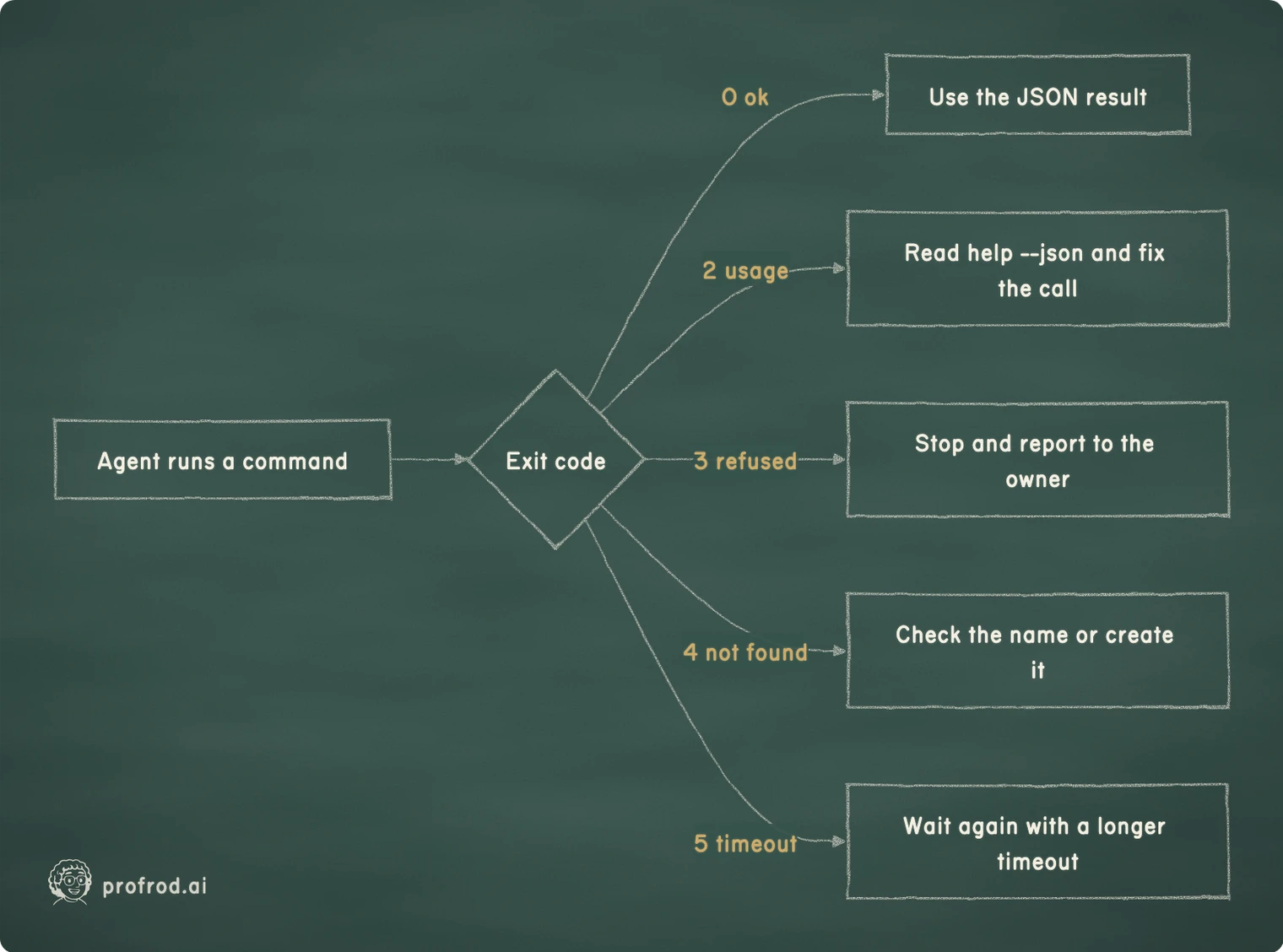
The agent never parses the message to decide what to do. The code picks the branch, and the next field supplies the exact command.
If your exit codes match and every failure has a next line, the tool passes the parts of the standard it covers. It doesn't cover rules 6, 9 and 10: there is no doctor, no AGENTS.md and no gate. Adding them is the exercise below.
The test that finds the rest
Your own checks prove what you thought to check. To find what you didn't, give a fresh agent only AGENTS.md, help --json and your released commands, and ask it to do the product's main job. Don't give it the source.
We did this for our website's deploys. A new agent got a charter and nothing else, and was told to deploy the next release. In its first session it found nine gaps. Among them: the site exposed its live commit only as a response header, with no version or health endpoint. The release's hash and signature were written only in a narrative report. And the careful, well-tested rollback tool shipped as a make target that needs a source checkout, which a release-only agent may not use. The authors had tested all of it. They just carried the context the tool lacked.
That is the general lesson. A tool's authors are the wrong testers of its agent experience, and a fresh agent finds the gaps in one session. Our audits also said what not to claim: a catalog alone isn't compliance, and a green build isn't a deployment. A deploy is done only when the live version, read back, matches the release.
Anthropic's engineering team reaches a similar conclusion for tools exposed to models. Their post Writing effective tools for agents recommends returning high-signal information and error responses that tell the agent specifically what to change, instead of opaque codes.
Exercise
Add the three rules jobs lacks, then test the result the way an agent would.
jobs doctor --json checks that the state file's directory is writable and that JOBS_STATE points somewhere sensible. Each failed check prints the command that fixes it. Give it its own exit code, and add the code to CODES.
One page: what jobs does, the five commands that matter, how to verify it, and what an agent must never do. The open AGENTS.md format is a plain Markdown file at the repository root.
Turn the command table above into a test that asserts every exit code and next line, and run it from a pre-push hook.
Give a new agent only AGENTS.md, help --json and the commands, with no source access, and ask it to submit and wait on a job. Count every place it stops.
For what a schema guarantees and what it doesn't, Chapter 2 covers typed tools. Chapter 19 covers keeping a deployment alive once agents operate it.
Typed tools are the in-process version of this article's rules: a schema the agent can rely on, and errors it can act on.


