

What this is, and what it is not
A dark software factory is a chain of stations, and each station is a tool an agent calls: run the tests, apply a patch, publish a page, file a record. A station the factory can trust has two properties. Its inputs, outputs and failures are explicit, so the agent cannot call it wrongly without the call failing. And every run leaves a receipt, so the factory's records can be rerun instead of believed.
You can write a Python function. The step that makes it usable by an agent is making its inputs, outputs and failures explicit to the caller, and then writing down exactly what you verified. This walkthrough builds one station with a small open-source library from the zeo project, ZeoCore, at a pinned release. The library is a vehicle; the two habits are the point:
- a typed tool contract, the same idea Chapter 2 of the book builds from scratch with Pydantic;
- a receipt: commit, versions, command, output and limits, so anyone can rerun your claim and see whether it still holds.
ZeoCore is MIT-licensed and published at github.com/profrodai/zeocore and on PyPI. Everything below is bound to the v0.1.0 tag, commit 4ce18ba3f051f64c7b6097896b66fc568f7e2e86. As of 2026-09-30 the latest release on PyPI is 0.11.0, and its package description mentions @capability tools, which this walkthrough does not cover. Treat every claim here as a claim about v0.1.0.
Bring Python 3.10 or later (the package's stated minimum; the checks below used 3.12, Colab's version), basic classes and a terminal.
Install
uv run --no-project --isolated --python 3.12 --with zeocore==0.1.0 python examples/minimal_tool.pyThat one command creates a throwaway environment with the pinned release and runs the example. In Colab or plain pip, pip install zeocore==0.1.0 does the same. No extras are needed for the word counter. The base dependencies declared at v0.1.0 are pydantic, pyyaml, rich, tqdm and Jinja2. Pydantic validates the request, context and result models; ordinary Python checks enforce tool identity.
The three pieces
Three names carry the contract, each in a file you can read at the tag:
BaseZeoTool(src/zeo_core/tools/base.py): the abstract base class every tool subclasses.ToolContext(src/zeo_core/tools/context.py): what a tool receives at call time: run id, logger, filesystem service and working directories.CapabilityResult(src/zeo_core/contracts/envelopes/result.py): the typed envelope every tool returns.
Build the tool
To run the complete program, download minimal_tool.py from the tag into an examples folder. It includes the temporary-directory setup and main() omitted from the fragments below.
Validation happens when these models are constructed, not automatically on every call to run.
from __future__ import annotations
import logging
from pydantic import BaseModel
from zeo_core.contracts import CapabilityResult
from zeo_core.core.fs import get_service as get_fs_service
from zeo_core.tools import BaseZeoTool, ToolContext


class WordCountRequest(BaseModel):
    text: str


class WordCountResponse(BaseModel):
    word_count: int
char_count: intThis example sets name and version as class attributes; BaseZeoTool.__init__ also accepts them as arguments. Construction configures the instance; invocation calls run(request, ctx). Those are different moments.
class WordCountTool(BaseZeoTool):
    name = "word_count"
    version = "1.0.0"

    def run(
        self, request: WordCountRequest, ctx: ToolContext
    ) -> CapabilityResult[WordCountResponse]:
        logger = ctx.require_logger()
        if logger is not None:
            logger.info(f"[{self.name}] counting words in {len(request.text)} chars")
        words = request.text.split()
        return CapabilityResult.ok(
            data=WordCountResponse(
                word_count=len(words),
                char_count=len(request.text),
            ),
            msg="Word count completed",
            metadata={"tool": f"{self.name} v{self.version}"},
)The caller builds the context and hands it to the tool.
ctx = ToolContext(
    run_id="minimal-run-001",
    tool_name="word_count",
    tool_version="1.0.0",
    logger=logging.getLogger("word_count"),
    fs=get_fs_service(),
    work_dir=str(tmp_dir),
    output_dir=str(tmp_dir),
)tool = WordCountTool()
init_result = tool.initialize(ctx)
request = WordCountRequest(text="...")
result = tool.run(request, ctx)
if result.status != "success":
raise RuntimeError(result.human_message)
print(result.data.word_count)The tagged file's input is "ZeoCore is a capability-authoring framework for doctrine-compliant tools." Splitting that string gives 8 words; its length is 73 characters. Compute both by hand before you run it, then compare. The program uses .split() and len(), so it illustrates the contract around a simple function, not word segmentation.
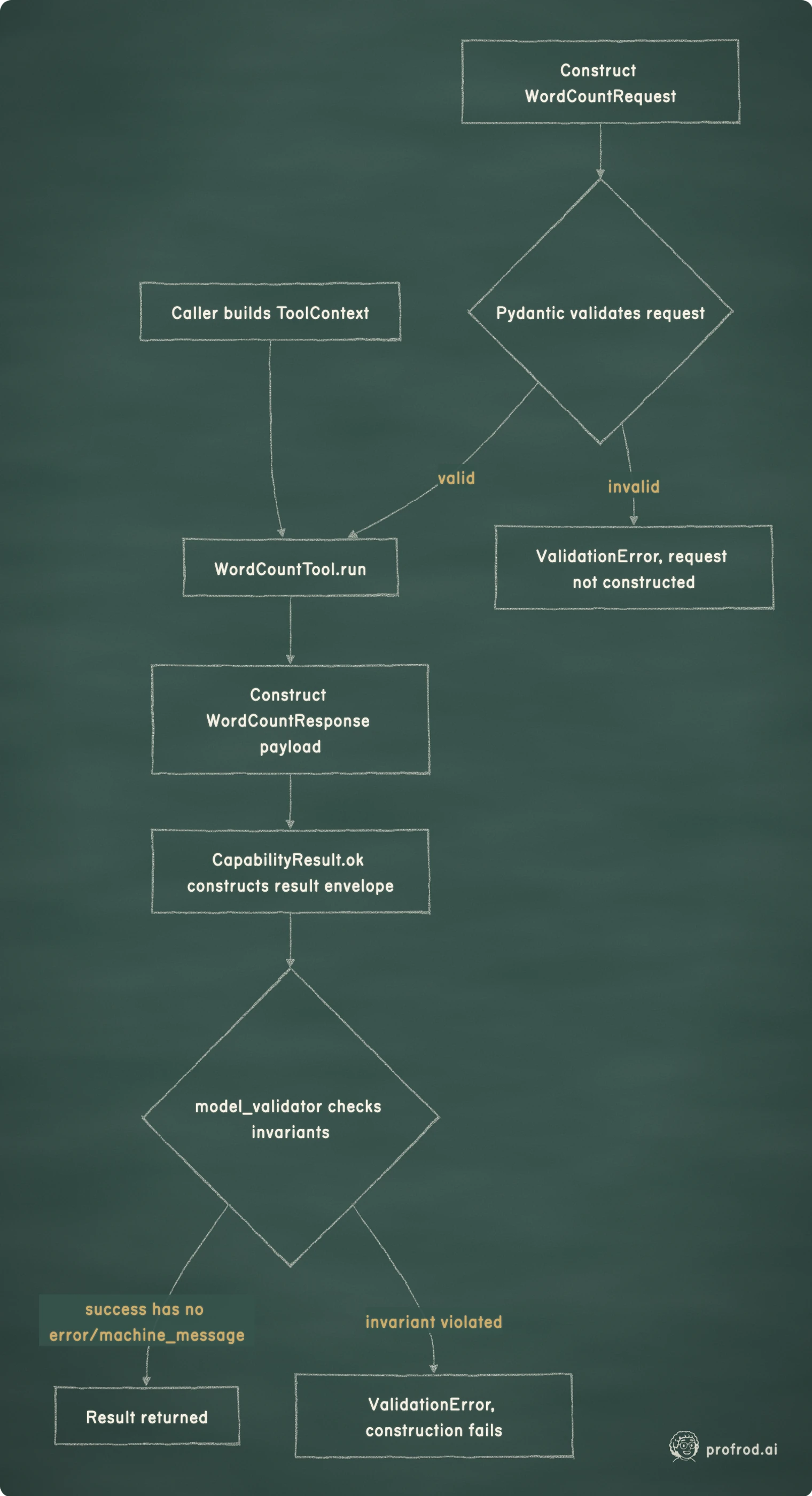
What the tagged classes check
These are v0.1.0 implementation claims, read from the source at the tag and exercised in the receipt below.
BaseZeoTool is an abc.ABC with one abstract method, run(self, request, ctx). You cannot instantiate a subclass that has not implemented it. name must be set as a class attribute or passed to __init__, or __init__ raises TypeError. version defaults to "1.0.0". After construction, the class overrides __setattr__ so that reassigning .name or .version raises AttributeError. That is a cooperative interface, not a security boundary: code can still change the private _identity_frozen flag. Two hooks have no-op defaults: initialize(self, ctx) and is_available(self, ctx).
ToolContext is a frozen Pydantic model (ConfigDict(frozen=True)), so assigning a field after construction fails; in the receipt, ctx.run_id = "r2" raised a ValidationError. Its required fields are run_id, tool_name, tool_version, logger, fs, work_dir and output_dir. The source comments say the two optional mappings, services and metadata, are made "top-level immutable via MappingProxyType", and the field validators do return a MappingProxyType. The run did not bear that out. With Pydantic 2.13.5, both attributes came back as plain dict objects, and adding a key to ctx.services succeeded. The likely reason is that Pydantic's own validation of the Mapping[str, Any] field runs after the mode="before" validator and produces a dict, but the receipt establishes only the behavior, not the cause. Treat the context's mappings as writable, and do not rely on them for isolation. .require_service(name) raises a ValueError listing the available services when one is missing.
CapabilityResult is a generic Pydantic model with extra="forbid", so a misspelled field fails construction instead of vanishing. status is success, skipped or error, and a model_validator(mode="after") enforces cross-field rules: error requires both error and machine_message; success must have neither; skipped requires machine_message and forbids error. A field_validator requires machine_message to start with "QC_". Four constructors, .ok(), .skip(), .fail() and .fail_from_exc(), build valid envelopes for you.
Break it three ways
Forget the name. A subclass with no name:
class BrokenTool(BaseZeoTool):
    def run(self, request, ctx):
        ...

BrokenTool()
raises before run is reachable, and the message hands you the fix:
TypeError: BrokenTool must either:
  1. Define 'name' as a class attribute, or
  2. Pass 'name' to __init__()
Example: class BrokenTool(BaseZeoTool):
    name = 'my_tool'
Send the wrong type. WordCountRequest(text=12345) fails at request construction with string_type, before the tool sees anything. That check exists because this request model declares it. BaseZeoTool.run is abstract and does not wrap subclasses in validation; a tool that accepts raw dicts must validate them itself.
Violate the result contract. Build an envelope by hand that claims success and carries a routing code:
CapabilityResult(
    status="success",
    data=WordCountResponse(word_count=1, char_count=5),
    human_message="Word count completed",
    machine_message="QC_UNEXPECTED",
)
Value error, status=success should not have machine_message (success is the default path, no special routing needed)
The error explains the rule: success is the default path and needs no routing code. A valid success envelope can still carry a wrong count, so you still need tests of what the tool computes. When a tool fails, return a typed error the same way; an empty list in place of an error is how agents end up reporting facts nobody observed. The same separation between a well-formed result and a correct one runs through Chapter 16's evaluation harness.
The receipt below covers two examples in clean Python 3.12 environments on one machine. It does not cover Windows, other Pydantic versions, or releases after v0.1.0. Extend a result only as far as the environments you actually ran.
Imports run before your code decides anything
The second example, toolkit_usage.py at the tag, runs with services={} to show graceful degradation, so on a working run it prints Uploaded file id: None without contacting Google. But it imports GoogleDriveService at module level, and that module imports google.auth. In a clean base install on 2026-09-30, the run failed before main():
  File ".../zeo_core/integrations/google/auth.py", line 11, in <module>
    from google.auth.transport.requests import Request
ModuleNotFoundError: No module named 'google'
Python extras declare additional installation dependencies; they do not control when an import runs. Installing the drive extra, which v0.1.0 declares with three Google client packages, fixed it: the same example, in a fresh environment with the extra, printed Uploaded file id: None. No credentials or live calls were needed.
pip install 'zeocore[drive]==0.1.0'
pip install 'zeocore[drive]==0.1.0'
pip install zeocore[drive]==0.1.0
The receipt
A receipt is what turns "I tried it and it works" into a claim someone else can rerun. It names the exact code, the environment, the command, the observed output and the limits.
| Field | 2026-09-07 check | 2026-09-30 check |
|---|---|---|
| Code | v0.1.0 source, commit 4ce18ba3 | zeocore 0.1.0 from PyPI (the wheel was not compared with the tag's commit) |
| Environment | Existing env, Python 3.14.3, Pydantic 2.13.4 | Clean uv --isolated envs, Python 3.12.13, Pydantic 2.13.5, macOS |
| Command | Source run of minimal_tool.py | uv run ... --with zeocore==0.1.0 python examples/minimal_tool.py, then toolkit_usage.py with and without [drive] |
| Observed | 8 words, 73 characters; three expected exceptions; nested metadata list mutable | 8 words, 73 characters; three expected exceptions; services and metadata plain dicts, new key accepted; base install ModuleNotFoundError; with [drive], Uploaded file id: None |
| Not checked | Clean install, Windows, Google example | Windows, other Pydantic versions, releases after v0.1.0 |
Scroll horizontally to view columns.
Notice what the second row of checks did. It confirmed the word count, turned an unverified install claim into a verified one, and contradicted a claim the first check had carried forward from the source comments. That is the reason to write receipts: the next run is only comparable if the last one wrote down what it was.
What to take from this
The three classes at the center of this contract are runtime checks, not naming conventions: a missing name stops a tool from existing, a wrong type stops a request from existing, and an inconsistent result stops an envelope from existing. The timing matters, and none of them proves the computed answer is right, that the tool had permission to act, or that an external effect can be undone. A source comment is not a behavior; a run is. Carry both habits, typed boundaries and receipts, into the next function you hand to an agent.
Why this matters in a lab
Research code is judged by whether someone else can rerun it and get your number. A receipt with a commit, versions, the command, the output and an explicit "not checked" line is the smallest unit of that, and it is what a reviewer of a take-home work sample can verify in minutes. The typed-tool half is the same contract a model relies on whenever it calls your code: a declared input, a declared result, and failures with names.
Chapter 2 builds typed tool interfaces, a dispatcher that validates every request, and tests that break requests before a model ever sends one, with the measurements behind each rule.


