Skip to content
Practice2026-08-1712 min readRev. 2026-08-17

Govern a Multi-Agent Project With Zero-Employee

Install the zeo CLI, write a real Statement of Work, and hit the exact schema error a beginner hits first. This is the tool this site's own governance arguments run on.

Key takeaways

  • Linting a Statement of Work is not style-checking. It is Pydantic schema validation that requires a runnable stopping predicate before an agent is allowed to claim work is in progress.
  • A WORKING-status SOW (DRAFT, DESIGN, PROGRESS, or RULING-REQUESTED) is reported by name, every time, if it lacks a non-empty done_when and restaufwand, regardless of how the surrounding prose reads.
  • The zeo CLI's spec option on intake propose takes a JSON object, not prose, and version 0.2.0 shipped a guarded error message because beginners piped plain text into it and got a raw traceback.
  • Running zeo with no arguments never errors. It is a human orientation dashboard that suggests zeo init when it finds no corpus, a deliberate design choice for a first run.

Rod Rivera

Author

Govern a Multi-Agent Project With Zero-Employee

Rod's note — read with a pencil; the margins are for you.

The tool this site's governance arguments actually run on

Install a CLI, scaffold a project, write a Statement of Work by hand, run the linter, watch it fail with a real error, fix the one field it names, watch it pass. That is the whole arc below, and along the way you will hit the one mistake almost every new user makes with the spec option on intake propose, because the project's own changelog says so.

The tool is zero-employee (CLI name zeo): an open-source Python package, MIT-licensed, built by this site's own authors. It is the mechanism behind every claim this corpus makes about statements of work, done-when predicates (a "how would anyone know this is finished" check, in one runnable line), and fleet-wide state boards. Version 0.3.0 is on PyPI now, Python 3.11+. This is not a claim that it has been battle-tested at scale — it has not, and the repository's own fixtures still use 2026 dates and a rate table with a joke model name in it. It is real, working, actively tested software at an early, honest stage, not a finished platform.

This is not a product pitch. It is a tutorial.

Where this comes from

Every command, error string, and file path below is copied from zero-employee's source (cli.py, schemas/sow.py, schemas/common.py, cost.py, core.py) and its own docs/tutorial.md, verified against the live repository and PyPI listing on 2026-08-17. Nothing here is paraphrased into looser language than the source uses.

Install it

zeo ships two ways. The maintainers recommend the isolated route:

bash
uv tool install zero-employee

uv tool install gives you a global zeo executable in its own isolated environment, which matters once you have more than one Python project on the machine with different dependency trees. pip install works the same way any package does, in whatever environment is active when you run it.

The CLI entry point is a hand-rolled dispatcher (zeo = "zero_employee.cli:main"), not built on argparse or Click. That is worth knowing before you go looking for a help flag output shaped like a typical Python CLI. Run zeo help for the command list, or just run zeo with nothing after it.

What "no arguments" actually does

Type zeo alone and it does not error. This is a real, verified design choice, not an oversight: bare zeo opens a human orientation dashboard, and if it cannot find a corpus of projects and SOWs in the current directory, it suggests zeo init. A beginner's first keystroke against a tool that governs multi-agent work is often a typo or an empty invocation, and the project chose to answer that with orientation instead of a stack trace.

The setup-and-first-lint sequence

Order matters here. Running the linter before a SOW exists tells you nothing; writing a SOW without knowing what the schema requires wastes a cycle. Do it in this order once, and you will never do it out of order again.

Install the CLI
bash
uv tool install zero-employee

Confirms zeo is on your path.

Scaffold a project
bash
zeo init

This creates the shape a corpus needs to exist: CLAUDE.md, a projects/ directory, a ruling/ directory, and an intake/ directory. Nothing you write later has anywhere to live without this step run first.

Write the SOW

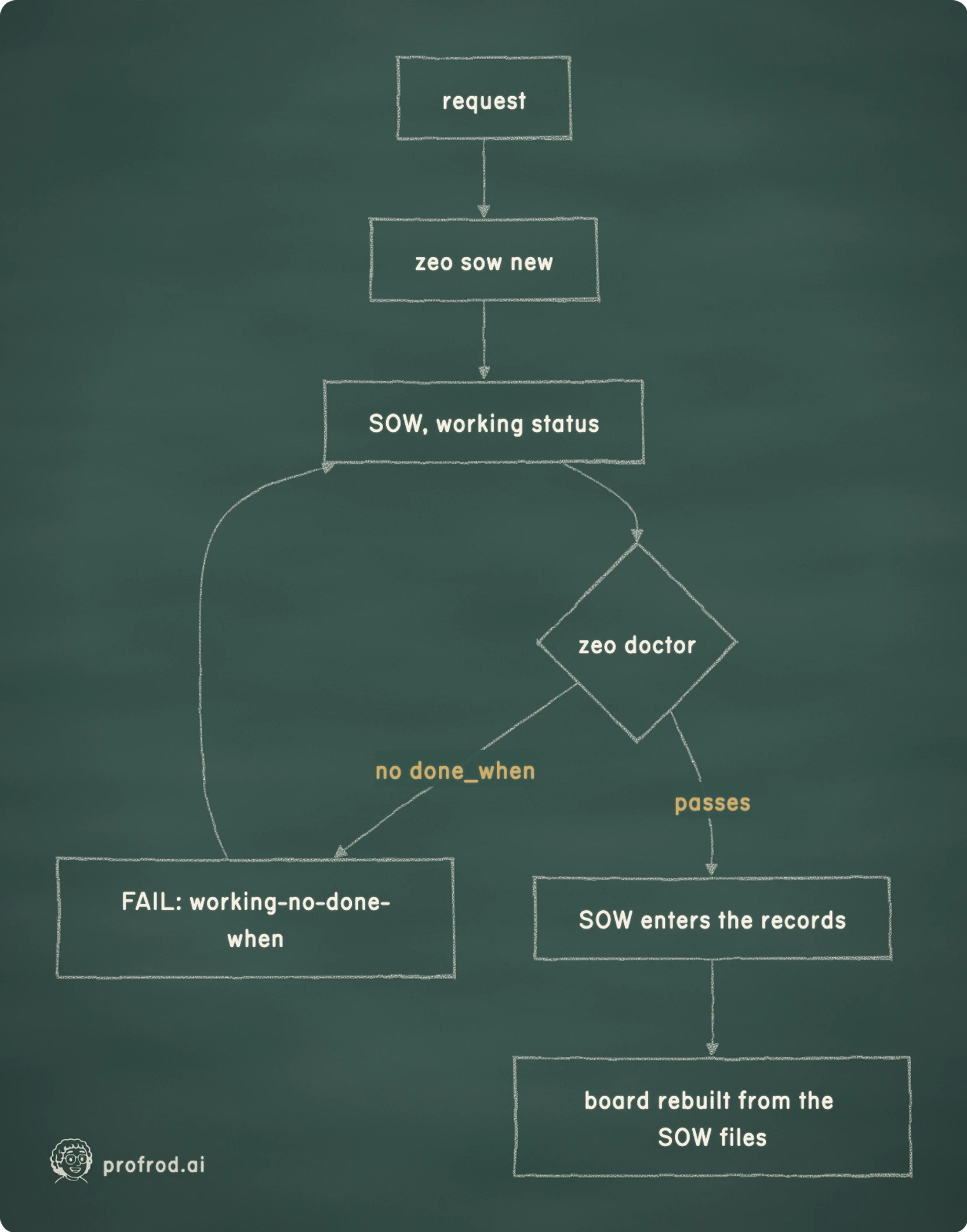
Type it directly in an editor, or generate the scaffold with zeo sow new. Either path lands as a markdown file with YAML frontmatter inside projects/<project>/sow/<sow-name>/.

Lint it
bash
zeo doctor <path-to-the-file>

zeo doctor needs a path. Run it bare and it prints a usage error instead of scanning anything, so give it the file you just wrote.

Watch it fail

A SOW in a WORKING status with no done_when fails, every time, with a specific rule ID and a suggested fix printed alongside it. See below for the exact text.

Fix the file

Add the one missing field the error named. Nothing else.

Watch it pass

Re-run the same command. The lines clear for that file.

What "linting" means here, because it is not what you think

Everyone who has used a code linter brings the same assumption into this tool, and the assumption is wrong. A code linter checks style: indentation, unused imports, line length. zeo's lint is Pydantic schema validation against a document's frontmatter, and what it validates is not prose quality, it is whether the document's claims are structurally capable of being checked later.

Concretely: schemas/common.py and schemas/sow.py define a closed set of legal values. A SOW's status field must be one of DRAFT, DESIGN, PROGRESS, RULING-REQUESTED, HELD, BLOCKED, SHIPPED, FINDING, CLOSEOUT, HANDOVER, SUPERSEDED, VOIDED, or STALE. Its lifecycle field must be one of DESIGN-MEMO, HANDOVER, SELF-CORRECTION, ESCALATION, DECISION-RECORD, CLOSEOUT-RECORD, or RECON. Those are enum checks, ordinary enough.

The rule that actually does governance work is this one: any SOW whose status falls in the "working" set (DRAFT, DESIGN, PROGRESS, RULING-REQUESTED) is required to carry a non-empty done_when and a non-empty restaufwand. A SOW can say anything it wants in prose about what it intends to accomplish. Mark it as in-progress work without also stating, in one runnable line, how anyone would know it is finished, and the check reports it, every time, by name, the way the transcript below shows.

The same mechanism extends past a single SOW. A ledger entry with state: SHIPPED or state: FINDING requires a non-empty commit and a non-empty check. A shipped or found claim with an empty check is treated as the exact failure this corpus elsewhere calls the SEAM failure: a claim nobody can falsify.

Quick check — What does zeo's lint command actually check?

A real SOW, and the exact failure it produces

Here is a Statement of Work exactly as it landed on disk during a real run of zeo intake promote, copied from the project's own docs/tutorial.md. It ended up at projects/payments/sow/health-check-endpoint/health-check-endpoint-SOW-01-add-a-health-check-endpoint.md:

yaml
---
sow: health-check-endpoint
n: 1
schema_rev: 17
project: payments
status: DESIGN
lifecycle: DESIGN-MEMO
created: '2026-08-17'
updated: '2026-08-17'
genre: sow
done_when: '`pytest test_health_endpoint.py` -> 2 passed (200 when pool healthy, 503
  when not)'
restaufwand: 1
sow_repo: example-org/org
work_repo: example-org/payments
requested_by: intake:2026-08-17-add-a-health-check-endpoint-to-the-payments
---

That version passes lint, because done_when names a real command and a real expected outcome: run pytest test_health_endpoint.py, expect 2 passed, one case for a healthy pool, one for an unhealthy one. Now delete the done_when line and lint the same file. status: DESIGN is still in the working set, so this is exactly the failure path the schema exists to catch. The source in schemas/sow.py produces this string:

status: DESIGN (sow) carries no done_when: - doctrine requires a runnable stopping predicate on any WORKING status. Fix: add done_when: "npm test -> 0 failures" (command + expected verdict)

And the terminal output for zeo doctor <path> against that file looks like this:

SOW NOT READY — projects/payments/sow/health-check-endpoint/health-check-endpoint-SOW-01-add-a-health-check-endpoint.md ✓ YAML valid ✓ Rev 17 ✓ filename = stream + n ✓ project exists ✓ stream exists ✓ n=1 consistent ✓ no historical artifact mutation ✗ required fields incomplete: Value error, done_when required for status DESIGN ✗ lint: status: DESIGN (sow) carries no done_when: - doctrine requires a runnable stopping predicate on any WORKING status. Fix: add done_when: "npm test -> 0 failures" (command + expected verdict)

Seven checks on the same file passed silently: the YAML parses, the schema revision matches, the filename matches the stream, the project and stream both exist, the sequence number is consistent, and nothing in the file mutates a prior historical record. Two failed, both pointing at the same missing field from two angles: the required-fields check names it directly, and the lint rule (working-no-done-when, the same rule ID this piece has been naming) explains the doctrine behind it and states the fix inline. Put the done_when line back, save, and re-run. Both lines clear. That is the whole loop: write, fail, read what's missing, fix the one field the check names, pass.

Where a SOW sits in the corpus, and what checks it on the way

The spec-flag trap that used to crash outright

Here is the beginner mistake the project's own 0.2.0 changelog documents by name. zeo intake propose accepts a spec option, and the interactive questions printed by zeo intake mission read like an invitation to answer in prose. They are not. The spec option takes a JSON object.

Before the fix, piping plain text into it crashed with a raw json.decoder.JSONDecodeError traceback, the kind of failure that tells a new user nothing about what they did wrong. The guarded error, confirmed from the current _load_spec_json() in cli.py, reads:

--spec wants JSON, not the prose it seems to invite
--spec is not valid JSON ({exc}). This flag takes a JSON object, not free-form prose - e.g. --spec - <<<'{"key": "value"}'. If you have prose notes, put them inside a JSON string value.

The fix for the beginner is exactly what the message says: wrap your notes as the value of a JSON key, not as bare text. The command below is valid; piping the same sentence with no braces around it is what triggers the message above.

bash
zeo intake propose --spec - <<<'{"notes": "add a health check endpoint to payments"}'

The interesting design decision is not that the flag requires JSON. Plenty of CLIs require structured input. It is that the maintainers treated the crash itself as the bug, not the user's misunderstanding, and shipped a message that names the exact fix in the same breath as the failure. It is the same doctrine working-no-done-when enforces on a SOW: an error is only useful if it tells you what to run next.

Two honestly-labeled numbers, briefly

zeo tracks cost in more than one way, and every path reports claims narrower than they sound. The repo-cost option is an ahead-of-work estimate: it walks your tracked text files, estimates tokens with tiktoken if installed or a chars-divided-by-3.6 fallback if not, and multiplies by a packaged rate table. kosten is a separate command reaching the same corpus-wide estimate from its own code path, not an alias of repo-cost. The session-cost option runs after the fact: it parses a Claude Code-style JSONL transcript and dedupes by message.id, because the code's own comment notes that streaming chunks repeat usage snapshots under one id. Left undeduped, a transcript can overcount usage by multiple times the real figure — the exact ratio depends on how many streaming chunks a given transcript emits per message, so treat "several times over" as an illustrative description of the mechanism, not a fixed published constant.

Every report from any of these paths carries its own honesty label, worded to match what that path can and cannot claim: the repo-cost path prints "ESTIMATE tokens x DERIVED USD (input rate only); not vendor billing," and the session-cost path prints "usage (from transcript/cost-log) x DERIVED USD; not vendor invoice." Different wording for a reason: one path is estimating from raw file text before any work happens, the other is reading real usage numbers out of a transcript after it does. Neither one is dressed up as a vendor invoice. It is also worth knowing the rate table itself is demo-flavored in places: it includes fictional model names like claude-fable-5, so treat the dollar figure as a shape, not an invoice.

Separately, the board option walks every SOW in the corpus, groups by stream, keeps only the latest revision per stream, and renders the result into a gitignored STATE.md. It is fully rebuilt on every run, never patched, which the project's own framing states plainly: a view over the corpus, not a second source of truth. If STATE.md and a SOW file disagree, the SOW file is right, because the board is derived from it, not the other way around.

What actually changed once the schema exists

Before the lint step exists, "in progress" is a status a person typed in good faith. After it, "in progress" is a claim the schema will not accept without a command a reader could run to check it. That is a small mechanical difference and a real one: it moves the honesty check from a human remembering to ask "how would we know this is done" to a tool that refuses to file the SOW until someone answers.

The early-stage caveat from the top of this piece still applies here, at the end, where it does its real work: what 0.3.0 verifiably does, today, is refuse to let a SOW claim active work without a way to prove the work stopped. The test suite backing that claim is real and growing (run pytest against a checkout of the repo to see the current count yourself, rather than trust a number printed here that will be stale by the time you read it) — but a large test count is evidence the checks fire reliably, not evidence the tool has been battle-tested at scale. For anyone running more than one agent against a shared codebase, that one refusal is most of the governance problem regardless.

Read the enforcement argument this tool implements

Permission rules are enforced by the harness, not the model. A SOW's done_when is the same idea one layer up: the check exists so an agent's claim of "done" is not taken on trust.

Ready to put an agent to work?

Join the Prof Rod newsletter for one educational lesson a week, with worked examples attached. It is free to register for and separate from the Zero Employee community.