
U.S. teaching example: Amounts are fictional USD prices, stored as integer cents. This is a U.S. version of the shop exercise, not a currency conversion or a record of a real charge.
The dictionary that lied by omission
Suppose an order-processing routine receives two rows for vanilla ice cream: one asks for 3 tubs, the other for 6. A helper converts the list into a dictionary keyed by SKU, the product identifier. The result contains {"vanilla": 6}. If the independently calculated requirement is six tubs, a downstream quantity check passes. The duplicate is hidden because the last row happened to contain the expected quantity.
The earlier row has disappeared from the dictionary, so a check receiving only that dictionary cannot discover it. Validate the row list before building the lookup. This is especially useful for model-generated proposals, which can contain repeated products even when each row has valid fields and types.
The right response depends on your business rule. Repeated SKUs might represent an accidental duplicate, separate shipments or an intentional split across warehouses. Preserve the rows long enough to make that decision explicitly. The worked example below uses a simple policy: one order line per SKU; repeated SKUs are rejected.
LLM duplicate key validation starts with the row list
A Python dictionary comprehension like {line.sku: line.quantity for line in lines} builds its result key by key, in order. When two lines share a key, the second write overwrites the first. There's no error, no warning, nothing in the resulting object that records the fact that an overwrite happened. If your validation logic runs after this conversion, the earlier proposal quantity is gone. You are checking a fact about the survivor, not a fact about the original list.
This is not a bug in Python. Dictionaries are supposed to behave this way; last-write-wins is the documented contract for building one from key-value pairs. The mistake is architectural: validating an artifact that has already thrown away information you needed for the check you're trying to run.
The teaching case behind this pattern comes from a course lesson on business-rule validation for a replenishment draft, which builds a stock-ordering example with a trusted inventory snapshot, a proposed order, and a unique_lines check that runs on the list of OrderLine objects before any dictionary is built (see the business-rule validation lesson). The lesson's validator raises a ValueError inside an after model validator if len(skus) != len(set(skus)), comparing the count of SKUs in the list against the count of unique SKUs, and does this on the list itself, never on a dictionary derived from it.
Working the vanilla example all the way through
Here is a small, self-contained version of the same idea, built only with the Python standard library so the mechanism is visible without any external dependency.
from dataclasses import dataclass
from collections import Counter

@dataclass
class OrderLine:
    sku: str
    quantity: int

def validate_no_duplicate_skus(lines):
    counts = Counter(line.sku for line in lines)
    duplicates = sorted(sku for sku, count in counts.items() if count > 1)
    if duplicates:
        raise ValueError(f"duplicate_sku: {duplicates}")
    return lines

def to_dict_unsafe(lines):
    # This line is the trap: last write wins, silently.
    return {line.sku: line.quantity for line in lines}

rows = [
    OrderLine("vanilla", 3),
    OrderLine("strawberry", 4),
    OrderLine("vanilla", 6),
]

# Validating after conversion hides the problem:
collapsed = to_dict_unsafe(rows)
print(collapsed)
# Expected output: {'vanilla': 6, 'strawberry': 4}
# This looks exactly like a correct, non-duplicate order.

# Validating before conversion catches it:
try:
    validate_no_duplicate_skus(rows)
except ValueError as error:
    print(error)
# Expected output: duplicate_sku: ['vanilla']
Trace the two outputs separately. collapsed prints {'vanilla': 6, 'strawberry': 4}. That dictionary is indistinguishable from what you'd get if the original list had contained exactly one vanilla row asking for 6 tubs and one strawberry row asking for 4. The 3-tub row is gone. If to_dict_unsafe is the first thing your pipeline calls, a downstream check receiving only that dictionary cannot recover the discarded row. validate_no_duplicate_skus, called on the raw list, raises before any collapsing happens, naming the offending SKU.
The order of the rows in the list is not incidental to the bug. If the list had been [vanilla:6, strawberry:4, vanilla:3] instead, the collapsed dictionary would show {'vanilla': 3, 'strawberry': 4} — a different, and now wrong, quantity, still with no sign that anything was overwritten. The correctness of the final dictionary, in the first ordering, was luck: the last-written value happened to match what a reader would expect. That's exactly why "the dictionary looks right" is not evidence of "the input was clean." It's evidence that this particular overwrite happened to land on an acceptable number.
The rejection branch exits before any row disappears. Only a list whose keys passed the uniqueness rule reaches dictionary construction and the quantity comparison.
Testing that the rejection doesn't depend on row order
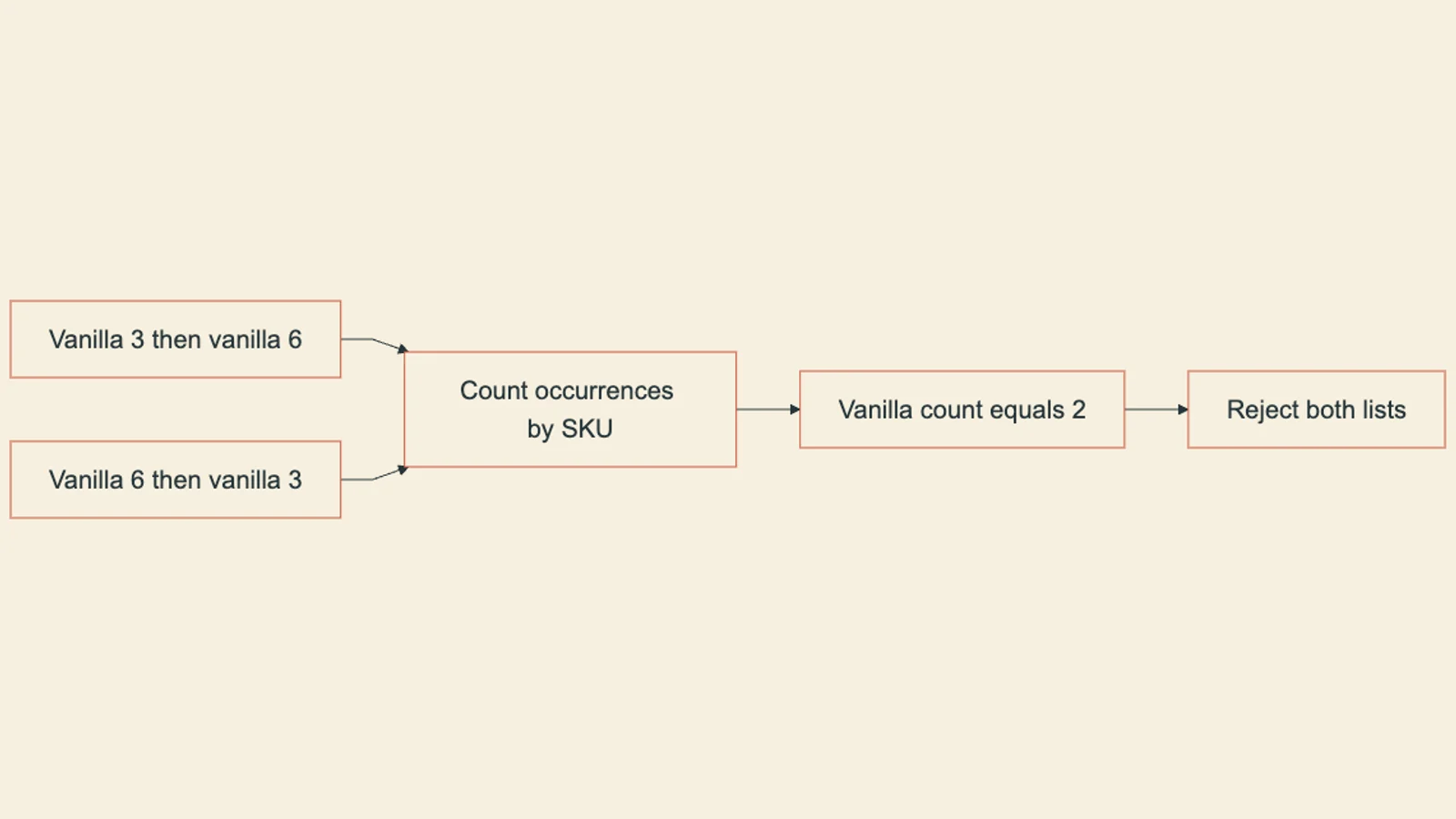
Test the reversed pair as well. Dictionary construction will select a different surviving quantity, while the uniqueness check should still reject the input.
pair_a = [OrderLine("vanilla", 3), OrderLine("vanilla", 6)]
pair_b = [OrderLine("vanilla", 6), OrderLine("vanilla", 3)]

for label, pair in [("forward", pair_a), ("reversed", pair_b)]:
    try:
        validate_no_duplicate_skus(pair)
        print(label, "unexpectedly passed")
    except ValueError as error:
        print(label, "->", error)
# Expected output:
# forward -> duplicate_sku: ['vanilla']
# reversed -> duplicate_sku: ['vanilla']
Both orderings should raise. Counter records two occurrences of vanilla in either list, and sorting the duplicate names makes the error deterministic. If your implementation accepts one ordering, inspect whether a dictionary conversion or an early return happens before all rows are checked. These two cases are useful controls; they do not exhaust every possible input.
The same principle applies to catalog records, not just order lines. If a product catalog has two entries for SKU vanilla with different prices, 250 cents in one row and 300 cents in another, a dictionary built from that catalog silently picks one price, and every downstream cost calculation is now working from a price nobody chose deliberately. The teaching lesson's Inventory model applies the identical unique_catalog check to the list of stock items before any lookup dictionary like {item.sku: item for item in inventory.items} gets built, for exactly this reason.
What this does and does not prove
The examples manipulate Python objects in one process. Their outputs establish what these functions do with the supplied lists. They cannot tell you whether an external catalog or purchasing service enforces the same rule. Locate the actual conversion and validation calls in your integration before transferring the result.
The OrderLine dataclass does not validate its type annotations at runtime. A caller can construct OrderLine("vanilla", "6") despite the int annotation. A real input boundary needs type and value checks before this uniqueness check. Pydantic strict mode can reject a numeric string for a strict integer field, but two valid integer rows can still share the same SKU. Field validation and list-level uniqueness need separate checks.
Use a boundary table to specify the intended behavior. Empty input illustrates why uniqueness alone is insufficient: an empty list has no repeated SKU, yet a replenishment request may require at least one line.
| Input shape | Uniqueness result | Additional decision |
|---|---|---|
| Empty list | Pass | Is an empty order allowed? |
| One vanilla row | Pass | Check quantity and known SKU |
| Vanilla 3, then vanilla 6 | Reject | Return the repeated SKU |
| Vanilla 6, then vanilla 3 | Reject | Same result after reordering |
| Two identical vanilla rows | Reject | Equal values are still duplicate keys |
Vanilla and vanilla | Distinct strings | Define canonical identifiers before counting |
If identifiers are case-insensitive, normalize them under a documented rule and validate the normalized list before building a dictionary. Otherwise a later lowercasing step can create a collision that the earlier check never saw. Keep original row references available for the error report.
Run the uniqueness check on the list of rows exactly as received, before any dictionary, set, or lookup table is constructed from it.
Confirm the rejection fires whether the duplicate's larger quantity comes first or last in the list, so you know the check doesn't depend on iteration order.
After checking uniqueness under the final key-normalization rule, build the lookup needed for comparison. This protects against duplicate-key loss; it does not preserve row order or fields deliberately omitted from the dictionary value.
A row can have the correct types, the correct field names, and still contain a duplicate SKU or a stale catalog price. Schema validation and duplicate-key validation check different things; passing one says nothing about the other.
Deciding what a duplicate should mean
Catching a duplicate is only half the job. The other half is deciding what happens next, and that decision belongs to whoever owns the receiving system, not to the validator. Two workable policies exist. The first is outright rejection: any duplicate SKU in a proposal is an error, full stop, and the proposal goes back for correction. The second is a documented merge rule, for example "sum the quantities" or "keep the row with the higher quantity," applied deliberately and logged, not inferred from whichever row a dictionary comprehension happened to write last. Both are legitimate. What's not legitimate is letting last-write-wins inside a dictionary comprehension make that decision by accident.
If your system chooses rejection, the error should name the offending SKU and the row indexes involved, so the sender can find and fix the specific duplicate rather than guessing from a generic "validation failed" message. If a single upstream feed repeatedly sends duplicate SKUs across many submissions, that's a signal to route the problem to the feed's owner rather than patching each individual submission by hand; a one-off correction fixes today's file, not tomorrow's.
Check the decision
Building this into your own pipeline
The transfer step is straightforward and worth doing on your own data before trusting any dictionary-based comparison in production code you're responsible for. Take whatever function currently converts a list of rows into a lookup dictionary, and check whether a uniqueness validation runs before that conversion or after it. If it runs after, or not at all, you have exactly the gap this article walks through: a lossy step sitting upstream of your business logic, quietly ready to make a duplicate look like a clean input. Add the list-level check, test it against both orderings of a deliberately duplicated pair, and only then trust the dictionary that comes out the other side.
The course builds this same duplicate check alongside stale-snapshot, unknown-SKU, and budget rules in one worked inventory example.


